


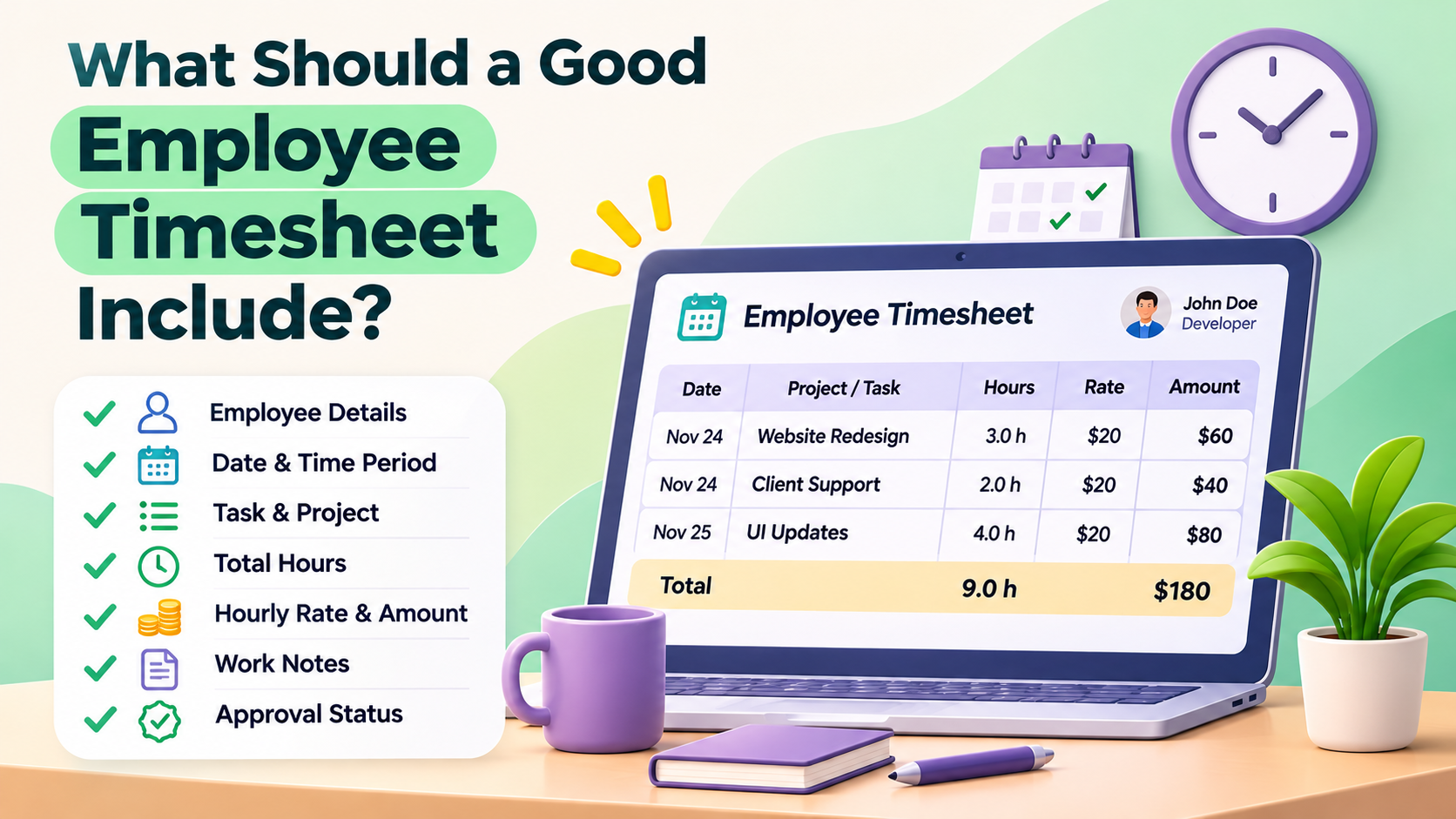

An employee timesheet is more than a list of working hours. It helps businesses understand when employees worked, which tasks they completed, and how much time was spent on different projects.
When important details are missing, managers may need to ask extra questions, correct records, or spend more time preparing reports and invoices.
A well-organized timesheet makes this process easier. But what information should it include?
Let's look at the most important details.
1. Employee Name and Basic Information
Every timesheet should clearly show whose working hours are being recorded.
This is especially important for businesses with several employees working on different projects.
Useful details include:
- Employee name
- Employee ID, if the company uses one
- Department or job role
- Manager or supervisor, when relevant
These details help managers identify records and avoid mixing up employees with similar names.
2. Date and Working Period
A timesheet should show exactly when the work took place.
At a minimum, it should include the date of each work record. Depending on the business, it may also show the start and end times.
For example:
| Date | Start Time | End Time |
|---|---|---|
| November 24 | 9:00 AM | 12:00 PM |
| November 24 | 1:00 PM | 5:00 PM |
Clear dates and time periods make it easier to review daily hours, compare records, and prepare weekly or monthly summaries.
3. Total Hours Worked
One of the most important parts of a timesheet is the total time worked.
Managers need to know how many hours each employee has recorded during a selected period.
A timesheet may show:
- Daily working hours
- Weekly working hours
- Monthly working hours
- Total hours for a specific project
For example, if an employee records 7 hours on Monday and 8 hours on Tuesday, the total for those two days is 15 hours.
Keeping these totals clear helps businesses review working hours without adding up every record manually.
4. Task and Project Details
Working hours become more useful when they are connected to the work being done.
For project-based businesses, a timesheet should ideally show the task or project linked to each work session.
For example:
| Project | Task | Hours |
|---|---|---|
| Website Redesign | Homepage Design | 3 |
| Website Redesign | Mobile Layout | 2 |
| Client Support | Customer Emails | 1 |
This gives managers a clearer idea of where time is going.
It also helps them understand how much effort different projects require.
5. Hourly Rate and Billable Amount
For businesses that charge clients by the hour, billing information can be an important part of time records.
Useful details may include:
- Employee hourly rate
- Billable hours
- Non-billable hours, where applicable
- Total billable amount
- Currency
For example:
An employee records 5 billable hours at an hourly rate of $20.
This makes it easier to understand how tracked time relates to client costs.
Remember that not every working hour needs to be billable. Internal meetings, training, and administrative work may be recorded separately depending on the company's billing rules.
6. Work Notes or Descriptions
A short description can explain what an employee worked on during a particular period.
For example:
- Updated the homepage layout.
- Fixed errors in the checkout process.
- Reviewed the client's requested changes.
- Prepared the weekly project report.
These notes are especially useful when a task name alone does not explain the work.
However, descriptions should stay short and relevant. Employees should not have to write long explanations for every time entry.
7. Overtime and Break Information
Some businesses need to review overtime and break periods separately.
Depending on company policy and local employment requirements, timesheets may include:
- Regular working hours
- Overtime hours
- Break periods
- Total payable hours
Keeping these details separate can help managers review employee schedules and calculate working time more clearly.
The exact rules for recording and paying overtime can vary by location, so businesses should follow the requirements that apply to them.
8. Approval or Review Status
In businesses where managers review timesheets before payroll or invoicing, it can be useful to include a review status.
For example:
- Not reviewed
- Under review
- Approved
- Needs correction
A clear status helps employees and managers understand which records still need attention.
If a business does not use a formal approval process, a simple review note or confirmation may be enough.
9. Corrections and Additional Notes
Sometimes an employee forgets to start tracking, enters the wrong time, or needs to explain a missing record.
A good record-keeping process should make corrections clear.
Useful information may include:
- What was corrected
- The date of the correction
- The reason for the change
- Who made or reviewed it
This helps businesses understand why a record changed instead of treating every updated number as an original entry.
10. Keep Timesheets Clear and Easy to Review
A timesheet does not need to contain every possible detail.
The goal is to include enough information to understand the work without making the process difficult for employees.
For most teams, the most useful details are:
- Employee name
- Work date
- Recorded hours
- Task or project
- Billable information, when needed
- Relevant notes
- Review status, when applicable
Businesses can add other fields based on their work and reporting needs.
How ZMorning Helps Keep Work Records Organized
ZMorning helps teams record working time and review it through a shared dashboard.
Employees use the desktop app to select their employer and assigned task before starting the timer. Recorded work is organized into ten-minute time slots.
When a task is selected, the tracked time can be connected to that task and its project. Managers can then review working hours, project information, employee records, and billing-related amounts.
ZMorning also supports manual time entry for missing work records. However, manual entries are stored separately and do not automatically include task or project attribution, screenshots, or keyboard and mouse activity counts.
This distinction is important when reviewing reports and preparing client billing records.
The goal is to keep work information clear and make it easier for managers to understand recorded time.
Final Thoughts
A good employee timesheet should answer a few simple questions: Who worked? When did they work? How much time did they record? And what work was that time spent on?
Adding the right details makes timesheets easier to review and more useful for project reporting, payroll preparation, and client billing.
Keep the information clear, avoid unnecessary fields, and choose a system that makes work records easy to understand.
A well-organized timesheet saves time for both employees and managers.